DeFlock.me
- 4.6
- Rating
- 100.00K
- Installs
- Free
- Price

 Analysis by App-foxy
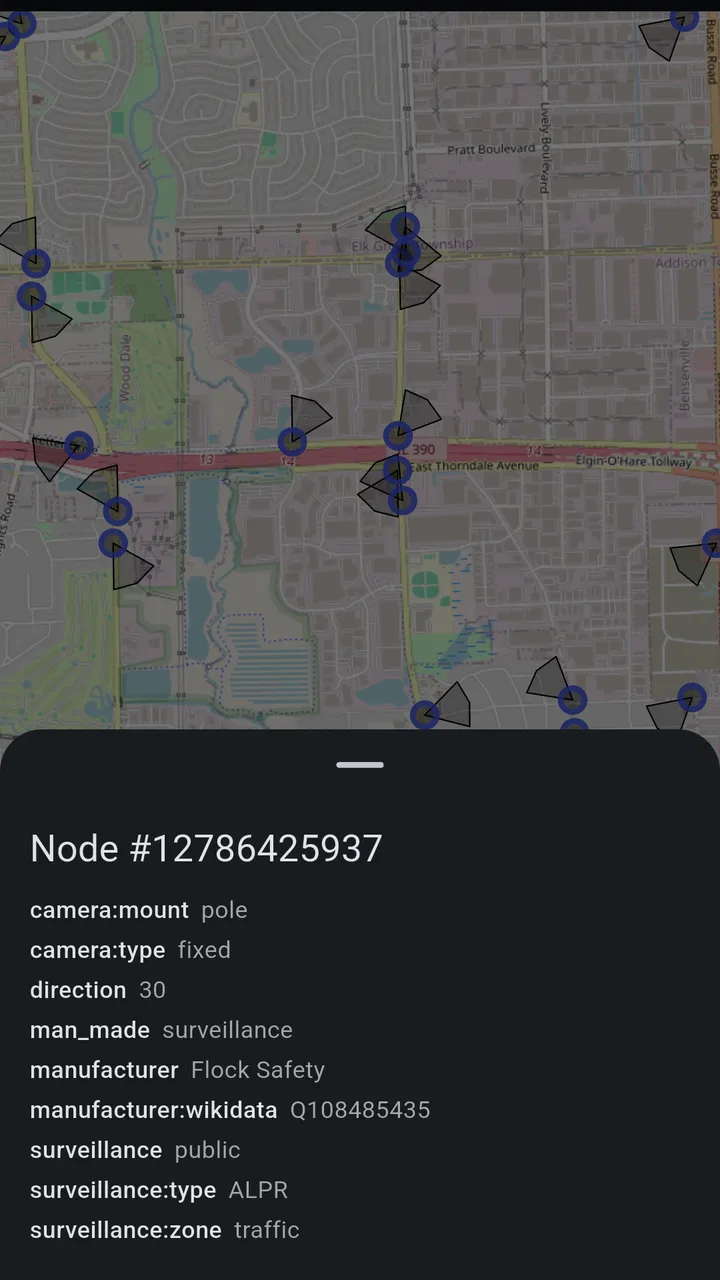
I approached DeFlock.me as a practical privacy tool rather than another map I would open only when planning a trip. Its purpose is unusually focused: it helps people find, report, and avoid mass-surveillance infrastructure in their communities. That immediately gives it a different rhythm from ordinary navigation apps. Google Maps, Apple Maps, and similar services are built around getting somewhere efficiently; this app asks me to think about what may be watching the road while I am getting there.
That distinction makes the first few days interesting. I could look at familiar streets with a new question in mind: which roadside equipment is simply part of traffic management, and which installations deserve closer attention? The app is free, aimed at Everyone, and comes from TechBS, so the barrier to trying it is low. It is listed in Maps & Navigation, but I would not treat it as a replacement for a full navigation service. I see it more as a privacy-focused layer for people who want awareness and community participation alongside their usual route planner.
What makes the first week appealing
The strongest early appeal is the change in perspective. A normal map turns a neighborhood into roads, businesses, addresses, and travel times. DeFlock.me encourages me to notice infrastructure that usually fades into the background. That can make even a familiar commute feel like a small investigation, especially for anyone who has already started thinking about automated license-plate readers, tracking, or the wider growth of mass surveillance.
You May Also Like

 Blood Strike: 2.5 Anniversary
Blood Strike’s Loadouts Turn Every Drop Into a Tactical Gamble
A close look at Blood Strike’s custom loadouts: how fast access to signature weapons reshapes its battle royale rhythm, rewards preparation, and narrows the gap between fights.

 Pandora - Music & Podcasts
Pandora’s Music Is Easy to Start, but Harder to Recover
Pandora’s strength is its low-effort path from a seed to a station. Its weak spot is how much confidence it asks you to place in connection, setup, and quiet recovery.

 8 Ball Pool
 Is Built on Rivalries, Rematches, and Routine
A close look at the rivalries, rematches, shared routines, and unanswered safety questions that turn a quick pool match into a persistent mobile community.

 Samsung Music
’s Quiet Strength Is Playing What You Already Own
Its reach comes less from spectacle than from dependable access to a personal library. That simplicity is both the app’s strongest retention engine and its ceiling.

 AccuWeather: Weather Radar
AccuWeather Review: A Quick, Clear Forecast for Everyday Decisions
For everyday plans, the best forecast is the one you can understand quickly. AccuWeather makes rain timing, radar, and local conditions easy to act on, with a few trade-offs.

 Hill Climb Racing
Why Hill Climb Racing Still Turns Crashes Into One More Run
A tiny car, a bumpy hill and one more upgrade: Hill Climb Racing keeps resurfacing because its simple chaos makes every near-miss feel personal.
More From Our News Desk



I also like the combination of viewing and reporting. A map that only displays information would be useful, but passive. The reporting angle gives the user a way to contribute when something appears relevant in the community. That creates a more active relationship with the app: I am not merely consuming a map; I am checking what is around me and deciding whether an observation is worth adding.
In an everyday scenario, I might be walking to a new café, cycling across town, or choosing between two routes to visit a friend. My regular navigation app would answer which route is faster. DeFlock.me can add a different consideration: whether one route passes infrastructure I would rather avoid. I would still use the mainstream app for turn-by-turn directions, then consult this one before leaving or while comparing alternatives. That two-app workflow is more realistic than expecting a specialist privacy map to handle every navigation task.
The first-week experience is also a useful test of motivation. If I enjoy checking the map, learning what the markers mean, and making careful reports, the app has a chance of becoming part of my routine. If I only open it once to satisfy curiosity, its novelty may disappear quickly. Its value depends less on constant entertainment and more on whether privacy awareness is something I want to practice repeatedly.
How I would use the map without overreacting
My first tip is to treat every visible item as a prompt for attention, not automatic proof of wrongdoing. A marker can tell me that an area deserves consideration, but it should not replace judgment about the exact road, the direction of travel, or the reason the equipment is installed. That matters because surveillance discussions can become vague very quickly. The useful habit is to connect the map with a specific decision: choose another street, learn more before passing through, or document an installation responsibly.
A second useful workflow is to check the map before a recurring journey rather than during a rushed trip. For example, I could review the route to work on a quiet evening, compare the main road with a parallel street, and decide whether the privacy trade-off is worth the extra time. This turns the app into a planning aid instead of a distraction while moving. I would avoid trying to inspect a map deeply while driving, since safety should come before any privacy preference.
Reporting also deserves care. When I notice equipment, I would record only what I can reasonably observe and avoid adding speculation about ownership, purpose, or individual behavior. A concise, location-focused contribution is more useful than an emotional description. This is one of the less obvious trade-offs: community mapping becomes stronger when users slow down and report conservatively, but that discipline also means contributing takes more thought than tapping a generic “problem” button.
Who will connect with it immediately
The app is a natural fit for privacy-conscious residents, digital-rights supporters, local researchers, journalists, cyclists who choose routes carefully, and people who want to understand how surveillance infrastructure is distributed in their area. It may also appeal to neighborhood groups that discuss public-space monitoring and want a shared visual starting point.
It is less suitable for someone who simply wants the fastest route, live traffic guidance, public-transport directions, or a broad travel-planning service. Those users will probably find a conventional navigation app more useful as their primary tool. DeFlock.me can sit beside that software, but it does not make the ordinary mapping experience unnecessary.
Whether it keeps earning attention after the first month
The month-to-month question is more demanding than the first-week question. A new map can feel compelling because it reveals something I had not considered before. After that discovery period, I need a reason to return. For this app, recurring value comes from changes in my routines, new places, and the possibility of contributing to a living community map. If I regularly travel through different neighborhoods, the app has more opportunities to remain relevant.
Its community element is important here. A report is not just a private note; it can potentially help other people make informed choices. That gives the app a civic dimension that ordinary map bookmarks do not have. The lasting appeal is therefore not only “where is the equipment?” but also “can my careful observation help make the local picture clearer?”
At the same time, I would not open it every day without a reason. Once I understand the common routes around me, repeated checks may provide little new information. This is not a weakness unique to the app so much as a consequence of its narrow purpose. It is a specialist utility, and specialist utilities often work best when attached to a real decision rather than forced into a daily screen-time habit.
A practical routine would be a monthly or occasional route review: before moving house, starting a new job, planning a long cycling route, or visiting a neighborhood where I have not traveled before. I could also revisit places where I previously noticed infrastructure and see whether the map now offers a clearer community picture. That kind of periodic use feels more sustainable than treating the app like a social feed.
What the rating and adoption suggest
The app has an average rating of 4.5 from around one hundred ratings, with roughly fifty written reviews, and it has passed ten thousand installs. Those figures suggest a small but engaged audience rather than a mass-market navigation product. I read that as encouraging for people who share the app’s specific concern, while also setting expectations: the experience is likely to feel more specialized than polished mainstream mapping software.
Its release date is October 2, 2025, and the current version is 2.7.2. That relatively recent presence matters when I think about long-term use. A privacy map needs continued attention because infrastructure, local knowledge, and user expectations can change. I would keep an eye on updates before making it central to every route decision, especially if I depend on it for a particular area.
The minimum operating-system requirement is Android 7.0, which keeps the app accessible to many older Android devices. That is helpful for people who do not replace phones frequently. Still, compatibility alone does not guarantee that the app will feel equally comfortable on every screen size or older handset. My advice would be to install it on the device I actually carry and test the map at home before relying on it away from familiar streets.
How it compares with the usual alternatives
The clearest comparison is with Google Maps or Apple Maps. Those services are better when I need comprehensive places, directions, traffic context, and an established travel workflow. DeFlock.me is better aligned with a narrower question: what surveillance infrastructure may affect the route or community I am examining? The two categories overlap on a map, but their priorities are different.
General privacy tools also solve a different problem. A browser privacy extension, encrypted messenger, or permission manager can reduce tracking in digital services, but none of those directly gives me a community-oriented view of roadside surveillance. DeFlock.me is more physical and local. Its usefulness depends on where I am and what I am trying to understand in that place.
That specialization creates a trade-off. The usual alternatives are convenient because they gather many travel needs into one familiar product. This app asks me to add a separate step and develop a separate habit. For a privacy-minded person, that extra step may be worthwhile. For someone who values simplicity above all else, it may feel like unnecessary friction after the initial curiosity fades.
The maintenance burden behind a useful privacy map
Any community reporting app creates work for both its users and its developer. I have to decide when an observation is reliable enough to share, remember to check the map when my route changes, and resist treating old information as permanently complete. TechBS has to maintain an experience that remains understandable and useful as people add reports and revisit locations. That maintenance is part of the product’s real value, even though it is less visible than the map itself.
For me, the biggest personal burden is verification. A quick glance from a moving vehicle is not a strong basis for a confident report. I would rather return on foot, stop safely, or use a trusted observation from a stationary position. That takes time. It also means the app rewards patient users more than impulsive ones. The result can be better community information, but only if people accept that responsible participation is slower.
Another maintenance issue is keeping my own mental map current. If I once decide to avoid a road, I should not assume the same decision will always be necessary. A route can change, my destination can change, and my priorities can change. The app is most helpful when it informs a decision rather than turning one old observation into a permanent rule.
There is also a privacy trade-off in using a privacy-focused app. I would want to understand its behavior on my own device before making it part of sensitive routines. That does not mean assuming the worst; it means applying the same careful thinking I use with any location-related service. I would avoid sharing more personal context than needed in reports and would use the app in a way that matches my comfort with location awareness.
Where fatigue can set in
The first source of fatigue is repetition. If I travel the same streets and see the same map information, the app may stop offering a fresh reason to open it. The second is uncertainty. When a marker needs interpretation, I may become frustrated if I want a simple yes-or-no answer. Surveillance infrastructure is not always visually obvious, and a map cannot remove every ambiguity surrounding what I see.
The third is the split workflow. I may need one app for directions, another for privacy context, and my own judgment to combine them. That can be worthwhile for a deliberate trip, but it is not ideal when I am late or navigating an unfamiliar area under pressure. In those moments, a standard navigation app is the better choice, and I would not let privacy research interfere with safe travel.
Reporting can cause fatigue too. The responsible approach requires attention to location, description, and confidence. If the interface makes that process feel like paperwork, casual contributors may stop participating. I would use the app most consistently when I had a clear observation to add, rather than setting myself an artificial target for reports.
Finally, the subject itself can become emotionally heavy. Constantly viewing streets through the lens of surveillance may make ordinary travel feel more alarming than informed. My solution would be to use the app with a defined purpose: compare routes, investigate a local concern, or contribute a careful report. After that, I would put it away. Privacy awareness should support my choices, not consume every journey.
My long-term verdict on keeping it installed
I think DeFlock.me earns lasting space on the phone of someone who genuinely wants to monitor and discuss mass-surveillance infrastructure in local communities. Its strongest quality is focus. It does not try to be another all-purpose travel app; it gives a privacy concern a geographic form and invites users to participate rather than merely read about the issue.
I would keep it installed if I lived in an area I wanted to study, traveled regularly through unfamiliar neighborhoods, or cared enough about route choice to accept an extra planning step. I would use it before journeys, during local research, and when I had a careful observation that might help others. That is a realistic, sustainable role for it.
I would skip it if I wanted one app to handle directions, traffic, places, transit, and trip planning. I would also avoid relying on it as the sole basis for a serious safety or legal decision. Its information is best treated as community-oriented context that supports personal judgment, not as a substitute for official guidance or careful observation.
The free price makes experimentation easy, and the Everyone age rating keeps the audience broad. TechBS has created a tool with a clear purpose, but the purpose is narrow enough that the app will not become essential for everyone. Its lasting value depends on whether I turn curiosity into a measured habit: check relevant routes, report responsibly, and return when the information can change a decision.
My final view is positive but selective. The app earns a permanent place as a specialist privacy companion, not as a replacement for everyday navigation. The novelty may fade after the first tour of familiar streets, yet the underlying use remains meaningful for people who want their local map to show more than roads and destinations. If that describes you, DeFlock.me is worth trying and judging over a month of real journeys rather than a single curious glance.
FAQs for DeFlock.me
01What is DeFlock.me and how does it work?
DeFlock.me is a social networking app designed to streamline group interactions and community building. It allows users to create or join interest-based groups, share content, and communicate through a range of features like messaging and event planning. The app aims to enhance user engagement by offering a platform that focuses on specific interests and hobbies.
02Is DeFlock.me free to use or does it have in-app purchases?
DeFlock.me is free to download and use for basic features. However, it offers in-app purchases for premium features such as advanced analytics, additional customization options for group pages, and ad-free browsing. These purchases are optional and intended to enhance the user experience for those who want more from the app.
03How secure is my personal information on DeFlock.me?
DeFlock.me prioritizes user privacy and employs robust security measures to protect personal data. The app uses encryption for data transmission and follows strict privacy policies. Users can control their privacy settings, deciding who can view their profile and activity. Regular security updates ensure ongoing protection against vulnerabilities.
04Can I use DeFlock.me offline, and what features are available without internet access?
While DeFlock.me is primarily designed for online interaction, some features are available offline. Users can draft posts, manage group lists, and view downloaded content without an internet connection. However, features like messaging, real-time updates, and event synchronization require internet access to function.
05What are the system requirements for installing DeFlock.me on Android and iOS devices?
DeFlock.me is compatible with Android devices running version 6.0 (Marshmallow) and later, and iOS devices with iOS 11.0 and above. It requires a minimum of 150 MB of free storage space. For optimal performance, a device with at least 2GB of RAM is recommended. Regular updates ensure compatibility with newer operating systems.
Pros
- User-friendly interface for easy navigation.
- Real-time notifications for updates and events.
- Customizable features to suit personal preferences.
- Seamless integration with social media platforms.
- Efficient customer support for quick resolution.
Cons
- Requires a stable internet connection.
- Limited offline functionality available.
- Some features locked behind a paywall.
- Minor bugs reported in the latest update.
- Occasional ads can disrupt user experience.

DeFlock.me
Gallery